Published 2019
Aviva: Approach and Learnings
Detail on the processes, workflow changes and learnings from building Aviva's Global Atomic Design System.
After a few sprints of understanding motivations and working with the inherited workflow, I started using sprint retrospectives to highlight impediments to achieving our goals and generate discussion around proposed actions.
This iterative “tunnelling” meant the team started to take ownership for focusing on steps that would achieve our goals.
Embedding design thinking
Design systems should enable Designers & Developers to solve challenges quickly and not prohibit their disciplines.
The “Framework” Design system wasn’t enabling designers. Our processes had to change to embed collaboration with our colleagues & empathy for their challenges.
We targeted four areas to change our workflow:
Shared ownership
Issue
Sprint prioritisation was only based on what we perceived we could deliver in 2 weeks over the value it added for designers, developers and our product goals.
Change
I proposed an ownership split between Product, Design & Development so we could significantly improve our backlog prioritisation to deliver value to each community.
Results
- Increased pattern flexibility and optional components
- We started removing the “US” and “THEM” feeling as people began to have regular contact with a framework of peers
- 40% of my time was freed to work with our consuming teams & discuss their challenges using the design system
Design efficiency
Issue
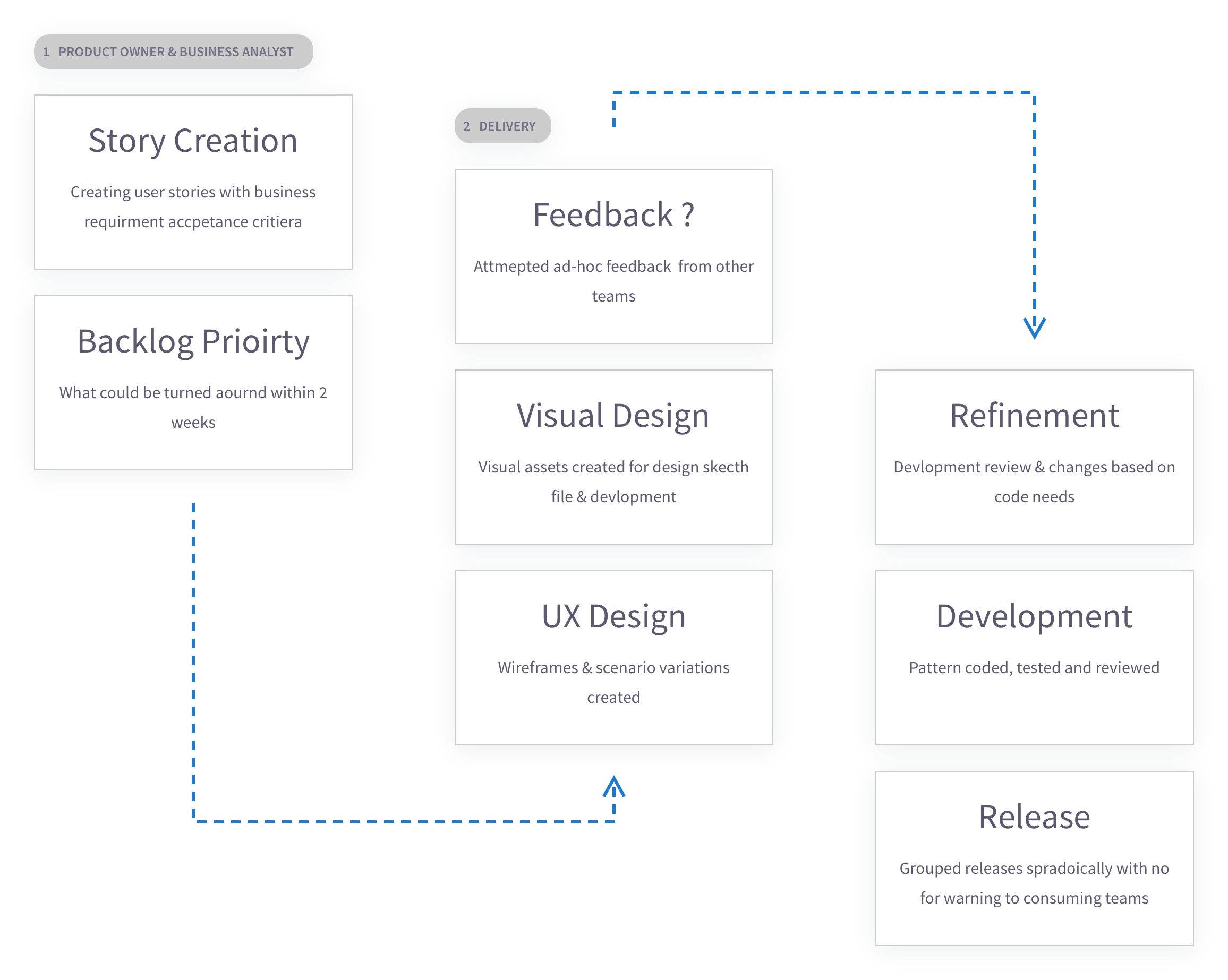
Stakeholders viewed pattern delivery as essential to address the early adopter issues. There was a focus on speed over researched pattern solutions.
Change
In response, I changed processes to deliver quicker and create an opening to conduct peer research:
- Lean UX practises were added to pass work to visual designers or into development quicker
- Design Sprints were introduced to understand feedback bottlenecks and seek external design critique
- We paired our designers (UX & UI) so each skillset could be used earlier and duplicated effort was reduced
Results
- Design leads from other product teams were able to critique patterns early, and started feeding issues or solutions into our backlog
- We started to see usability studies feed into our pattern designs
- We saw a 50% increase in design delivery
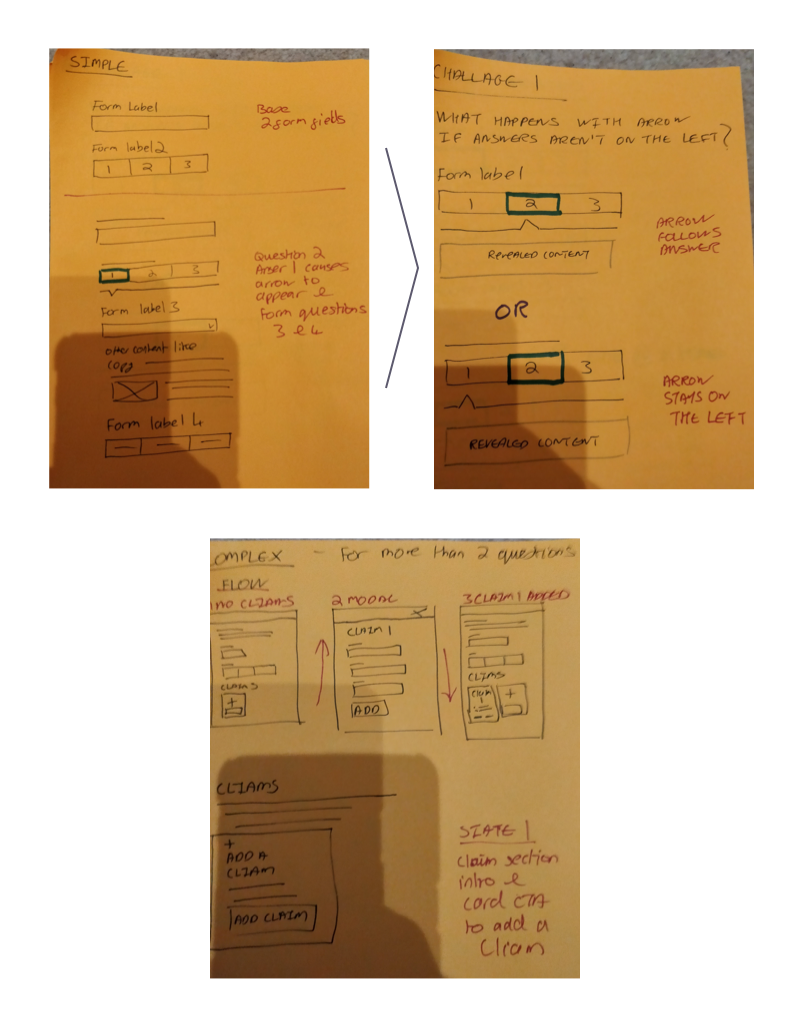
Sketch example
Example of just using sketches & spikes for UX delivery, leading to investigating interaction options and visual cue experiments. No wireframes were needed.
Dual-track agile
Issue
Communication with our consuming teams was poor, and feedback loops slow.
Change
We added a second agile stream that would focus on communication & building relationships with the groups using the Framework.
Agile streams
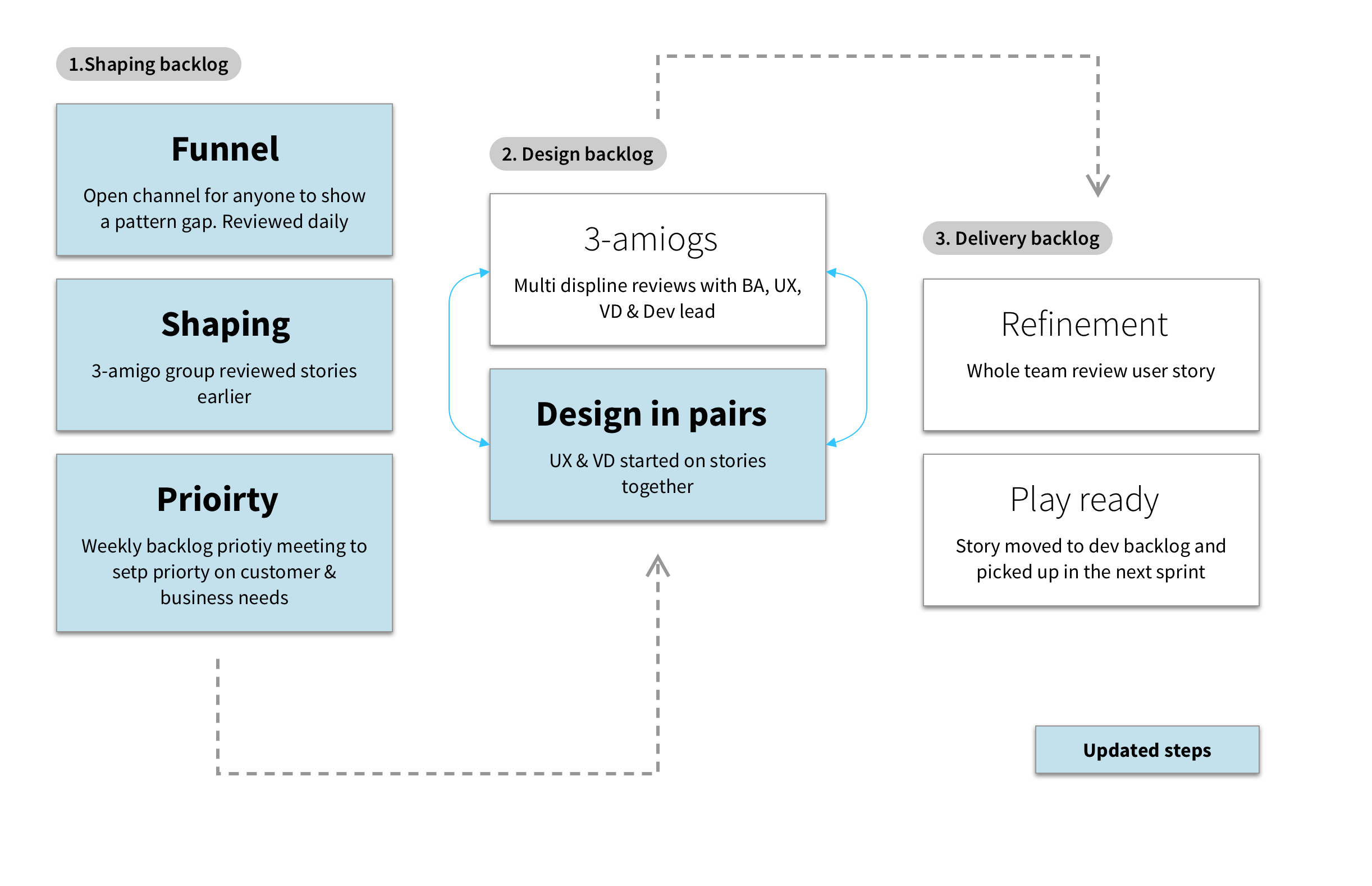
- Shaping track (new) — Moved the ‘3-amigos’ group upstream, enabling our colleagues to highlight gaps, issues and suggestions upfront
- Delivery track — Focused on delivering patterns and verifying solutions directly with consuming team members rather than relying solely on design leads
Results
- Increased cross-discipline collaboration within our team
- UX & UI considerations for stories were exposed earlier
- It allowed us to demonstrate to consuming teams that their issues with the design system would be listened to and acted on
- Expanded our relationships with the consuming teams and started allowing us to consume designs from them
Asynchronous working
Issue
Our working habits didn’t help us collaborate and work with people in other countries and time zones.
Change
I worked across two office locations and from home. I introduced process changes to help my team learn about distributed working.
Workflow changes
- Added a single JIRA board for Framework queries, pattern gaps and proposed solutions
- The ‘3-amigos’ group met daily to review the issues coming from our colleagues
- Encouraged team socials and workshops when face to face
Results
- I travelled to the Norwich office (where the Framework development team was) to build deeper relationships
- The single JIRA board became the go-to funnel for anyone at Aviva expressing an issue with the Framework. By being active with it every day, we started to be trusted that a design system problem would be reacted to. Colleagues began using the board to propose solutions
- Solutions could be added to the next sprint with collaboration from the person raising the problem
Team enablement and growth
Changing the operating environment for my team members to flourish
As our team grew to be seven designers, I realised the collaborative processes would also enable their individual growth.
The focus helped the team realise we could create a collaborative design system.
To lay the groundwork, we focused on:
A changed workflow
Change
Our changes to ownership, planning and delivery efficiency enabled us to embed design thinking into our process:
- Empathy for our colleagues (users) grew and was baked into our processes
- The UX or UI value in pattern changes was considered early
- The changes opened the door to growing our team and bringing in research insight to shape the system
Results
- The funnel enabled us to assign team members to respond daily to user questions and bug reports
- With shaping an explicit step, it made it clearer to users how to contribute to the design system, and we started injecting component designs from around the business
- In prioritisation, we had an easier time surfacing where component needs were coming from to define their reuse value
Working in design pairs (UX & UI)
Issue
Separate UX & Visual Design (UI) employees were causing duplication of effort & lost context between different designers.
Each person could feel limited or constrained, or critical information might be known by one but not the other. Our framework UI team members felt they couldn’t contribute and our UX felt constrained by interface rules.
Change
To solve this, we changed to have each story operated with design pairs — one UX & one UI person from the word go.
This included changing to a co-leadership model for our leads. One of our visual designers was ready to make his next career step.
Results
- Team unity became stronger
- Stories were delivered quicker
- Visual designers and UX designers have overlapping roles. Having both disciplines present at the start of a user story meant each could work together and shape the direction simultaneously
What did I learn
Leading a team that works with each other in an open and trusting way is a very humbling experience. Most of this case study is down to this teamwork. Yes, I can claim ideas, and so can my team members, but the group brought them to life.
Design systems can’t live in isolation
Design systems can’t live in isolation with one team. Open communication with fellow products and designers is critical.
Multiple agile streams significantly increased momentum
A design system should run multiple work streams that match company practices and expectations. At Aviva, this meant:
- Communication & Strategy — Be visible, share roadmaps and ensure we are easily contactable. The backlog should be driven by the needs of teams using the system
- Research — with end users (the patterns we make) and our customers (colleagues using the system)
- Design & delivery — creating, updating & building components
Teamwork is essential
The scrum team I joined had successfully adopted an agile mindset, making changes to pull design thinking to the forefront much easier. Our team’s open and collaborative nature meant we learnt from each other frequently and built trust with each other’s abilities. When reaching out to other groups, we took this culture with us and slowly saw other teams follow suit.
Mentoring & guiding is a two-way dialogue
Leading a design team with these behaviours meant mentoring and guiding was more open and a two-way dialogue. I was able to evolve my practices as well as impart knowledge.